Intros and outros are small clips inserted in front of or at the end of videos. Their main purpose is to catch viewers’ attention quickly or promote brands. There are loads of free intro and outro makers that can help you make one. However, few of them are watermark-free.
After days of searching and comparison, we have summarized the top free intro and outro makers no watermark. Check them out and decide which one is the best to create an intro/outro.
List of the Free Intro & Outro Video Makers No Watermark
Special Recommendation: FlexClip's Intro/Outro Video Maker
Let's be honest. While free intro/outro video makers are great when starting out, they do come with a hidden tax - your time. You might need to deal with the clunky timelines, bypass the limitations, or hunt down free templates. It is just exhausting.
If you value your time, and want a better result, switching to a premium powerhouse like FlexClip is no-brainer. It takes the guesswork out of video editing, allowing you to pick any templte you like, upload resources, and export a studio-grade intro/outro in just several seconds. When you think of the convenience and the time saved, investing a few dollars is a smart move.
FlexClip Intro/Outro Maker Overview
Key Features of FlexClip's Intro/Outro Maker


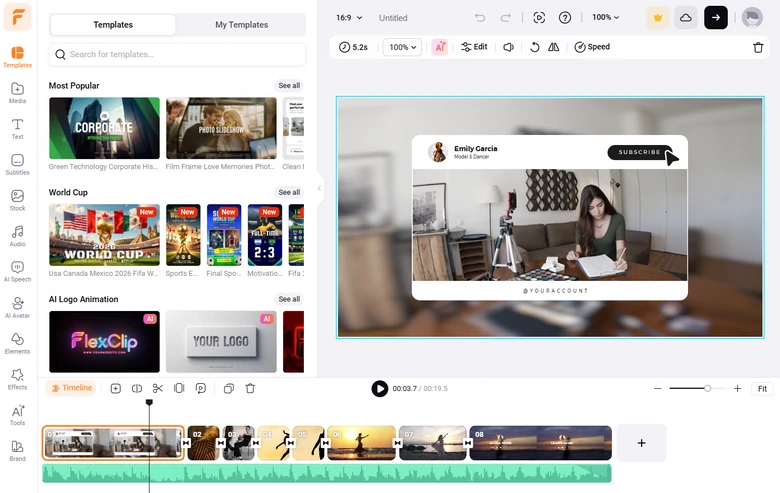
FlexClip Editing Panel Overview
1. CapCut
When I started creating video content, I always trapped in complex timeline, found right resources, and wasted hours messing with animations. CapCut completely shifted my perspective by turning that tedious process into something fast and intuitive, giving me the tools and resources to create sharp, three-second hooks and polished closing screens without needing a background in motion design.
What really sets it apart for me is how smoothly it fits into a non-linear, modern workflow. I can start an intro on my phone during a commute, tweak the next on a tablet, and finish the final audio sync on the desktop version. The flexible, cloud-synced ecosystem is one of a kind in our best intro/outro maker list.
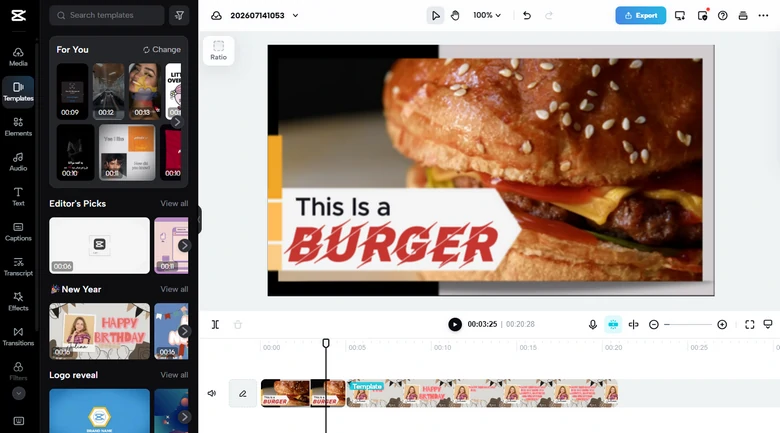
CapCut Editing Panel Overview
Key Features of CapCut's Intro & Outro Maker
How to Bypass CapCut Watermark While Remaining Free
By default, CapCut tacks a 2-second slip with their logo onto the end of every timeline. As for existing project, you can select the outro and hit the Delete button. You can also disable the default outro by navigating to the Settings > Add Default Ending, then tapping Discard.
Another thing to note is that CapCut burns a logo into the output if you use pre-made creator templates or premium assets. Always avoid using templates or assets with a Pro tag.
2. ClipChamp
ClipChamp is Microsoft's default video editor and I was skeptical about whether it can handle serious content creation. However, it quickly won me over as an incredibly dependable, no-nonsense desktop editor. Because it runs directly in your browser or through a lightweight Windows app. In a word, it is a highly organized workspace that handles 1080P rendering without making my computer fans spin out of control.
When it comes to building intros and outros, ClipChamp acts like a structured blueprint, emphasizing clean layouts and pratical utility rather than fast-paced social trends. What makes it highly effective for these sequences is its precision formatting, especially its pre-spaced YouTube end-card grids that align perfectly with interactive channel buttons, and a built-in brand kit that lets you apply channel fonts, color palettes to generic templates in a single click.
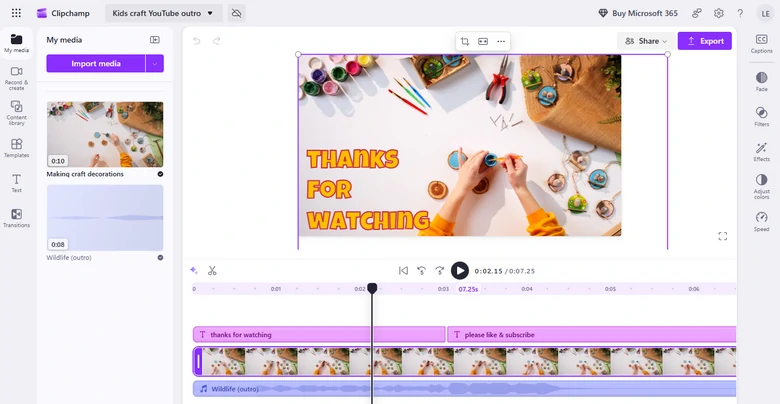
ClipChamp Editing Panel Overview
Key Features of CapCut's Intro & Outro Maker
How to Bypass ClipChamp Watermark While Remaining Free
By default, the free version of ClipChamp doesn't add a watermark to your exported intro and outro videos. If you are seeing a watermark on your video preview or being blocked from exporting without one, it means you have accidentally used a Premium asset or feature. You can remove the premium stock assets or download in 1080P maximumly.
3. Adobe Express
For years, I associated the Adobe ecosystem with steep learning curves and heavy system requirements. Adobe Express completely upends that expectation by offering a fast, browser-based workspace where I can assemble high-quality, professional video hooks in a matter of minutes, giving my channel branding a polished editorial look right from the start.
What really like Adobe Express is its unparalleled creative asset library. It gives your intro and outro sequences a distinct, high-production feel. For instance, the gorgeous Adobe Fonts and high-tier design assets means my title cards never look generic or cookie-cutter. Meanwhile, you can also utilize assets created with Adobe Photoshop, or make further edits with Adobe Premiere Pro.
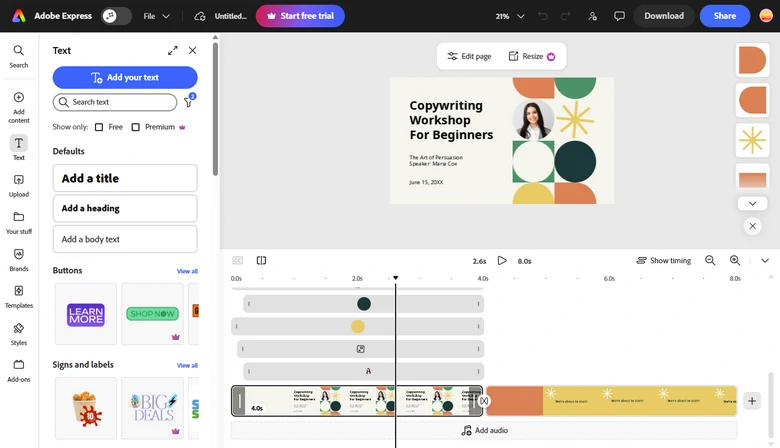
Adobe Express Editing Panel Overview
Key Features of Adobe Express's Intro & Outro Maker
How to Bypass Adobe Express Watermark While Remaining Free
Adobe watermark typically appear if you accidentally include a premium asset, such as a premium template, stock photo, or premium font in your project. To keep your designs completely free and watermark-free, you just need to replace the premium assets.
4. Canva
Canva is the graphic design tool I personally use and return to most. Its big evolution into video editing has made it an absolute powerhouse for opening and closing hooks. The beauty of the platform lies in its layout flexibility. It treats your video timeline like a canvas, allowing you to drag, drop, align, and animate design elements with a level of spatial freedom that traditional vieo editors just fail to match.
What really cements its place in my workflow is how effortlessly it bridges the gap between asset creation and video production. Instead of having to design a logo or an end-card graphic in one app and import to another, I can build, color-match, and animate brand's assets all inside the same workspace. It also comes with seamless collaboration tools that let a team tweak the sequence in real time.
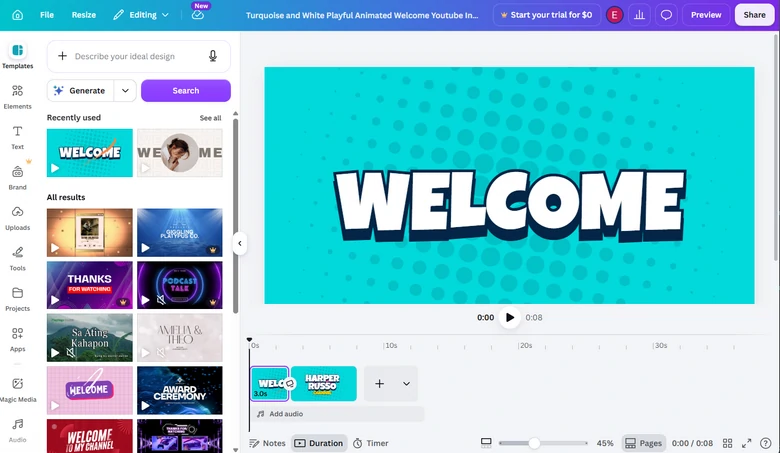
Canva Editing Panel Overview
Key Features of Canva's Intro & Outro Maker
How to Bypass Canva Watermark While Remaining Free
If your design has a Canva watermark, it is because you are using a premium element on a Canva free account. The best thing to do is to replace the premium asset with one of Canva's millions of free alternatives.
5. ShotCut
The above 4 tools are all web-based platforms. They restrict your creative freedom behind paywalls or subscription tiers to some extent. Shotcut is a fully featured, free desktop editor that gives me absolute control over my timeline. It doesn't rely on premade templates, but lack of restriction is exactly what makes it great. It forced me to understand the mechanics of good video editing, allowing me to build custom opening hooks and ending scenes from scratch without any watermarks or resolution limits.
What I appreciate most about Shotcut is its raw power and flexibility when it comes to custom animations. Because it features a robust Keyframe system and massive library of customizable video and audio filters, I can design incredibly precise title reveals, glitch effects, and color grading styles that are uniquely my own. It also handles heavy, high-bitrate footage and intricate audio layering with ease, meaning I can sync cinematic sound effects directly to complex video transitions.
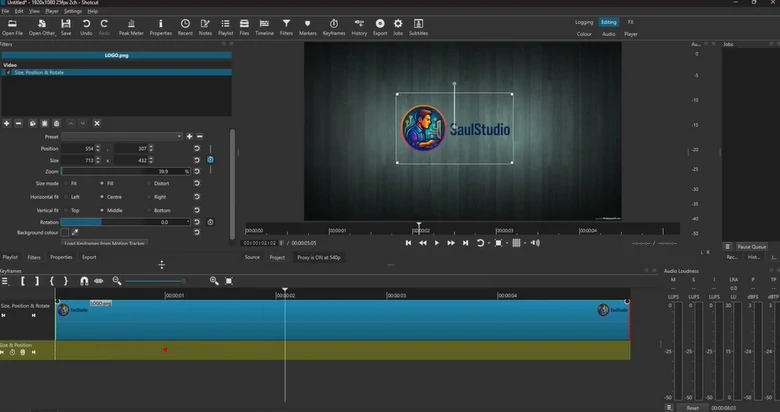
ShotCut Editing Panel Overview
Key Features of ShotCut's Intro & Outro Maker
The Bottom Line
That's all for the best free intro and outro makers without any watermark. If you recommend other intro and outro video editors, let us know via Facebook. We'll appreciate it if you can share this helpful post with others.




FlexClip AI Video Maker
Reach professional-quality videos faster with easy editing tools, templates, and smart AI.
Start Now for Free
Hot & Trending
-
Best Ways to Find Music in YouTube Videos
-
Instagram Story Video Quality Bad After Upload? Fix It!
-
How to Repost Video on TikTok & How to Remove TikTok Repost
-

Improve Video Quality Online: 3 AI Video Quality Enhancers You Can't Miss
-
4K Convert to HD 1080p without Watermark: Best 4k Video Converters
-
Best 8 Free Video Editors - No Download Required
-
Top 13 Birthday Video Makers with Music and Effects Free
-
How to Search Filters on TikTok & Use a Filter You See - TikTok Filter Guide