4 Best Ways to Convert Chinese Text to Speech (TTS Mandarin, TTS Cantonese, etc.)

Last Updated: 2026. 07. 20

Converting Chinese text to speech offers you an easy way to turn written Chinese content into realistic Chinese AI voices for your video projects’ voiceovers, audiobooks, E-learning materials, podcasts, product explainers, etc.

If you are looking for a versatile Chinese text-to-speech converter that can help you effortlessly convert Chinese text to speech, we’ve got you covered!

In this tutorial, we will walk you through the 4 best ways to easily convert Chinese text to speech with idiomatic Mandarin, Cantonese, and Taiwanese accents online. So, you can use realistic AI Chinese voices for YouTube videos, audiobooks, podcasts, and more.

Here's what you'll learn:

Also, read the 6 best AI video script generators.

1. FlexClip

If you are looking to convert Chinese text to speech in Mandarin, Cantonese, etc. for your podcast shows, voiceovers of YouTube videos, TikTok, Instagram Reels, or to convert Chinese ebooks, and your blog posts to Mandarin/Cantonese text to speech voices for language learning and promo videos, etc. then the user-friendly and feature-packed FlexClip AI video maker deserves to be your first pick.

Convert Chinese text to speech in a breeze with FlexClip online.

Best Features to Convert Chinese Text to Speech with FlexClip:
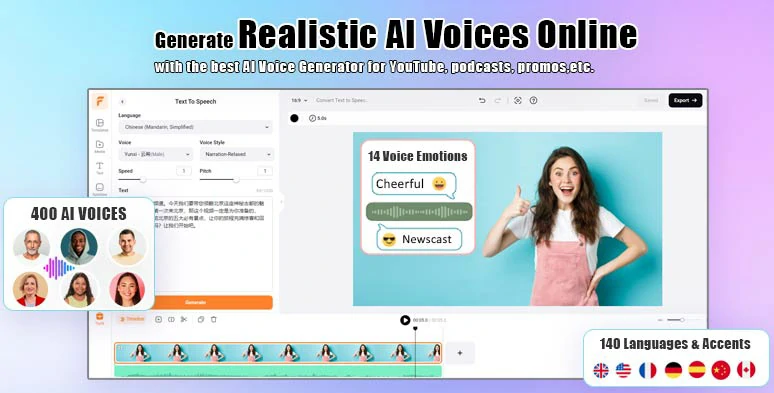
  • Select from a treasure trove of multiple realistic TTS Chinese AI voices, covering different idiomatic Mandarin accents, Cantonese accents, and Taiwanese accents, Hong Kong accents, plus a rich array of regional accents like Northeastern, Southwestern, Wu/Shanghai, Sichuan, and Henan. You may also clone any voice you want for turning your text into. Besides, both simplified and traditional Chinese texts are also applicable.
  • Effortlessly convert Chinese text to realistic Chinese AI voices with FlexClip

    Effortlessly convert Chinese text to realistic Chinese AI voices with FlexClip.

    Use Free TTS
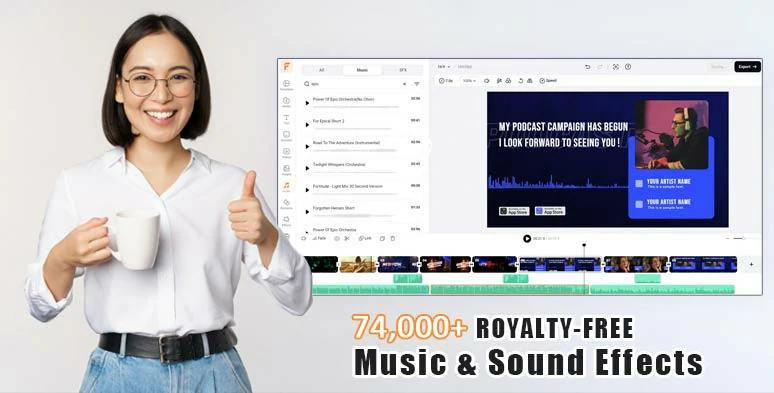
  • Easily trim, split, and merge TTS Chinese voices on the intuitive timeline and pick from 74,000+ royalty-free music tracks and sound effects for audio mixing with Chinese text-to-speech voices to add emotions and vibes for YouTube videos, audiobooks, podcasts, E-learning voiceovers, etc.
  • Use vast royalty-free music and sound effects to breathe new life into Chinese AI voices

    Use vast royalty-free music and sound effects to breathe new life into Chinese AI voices.
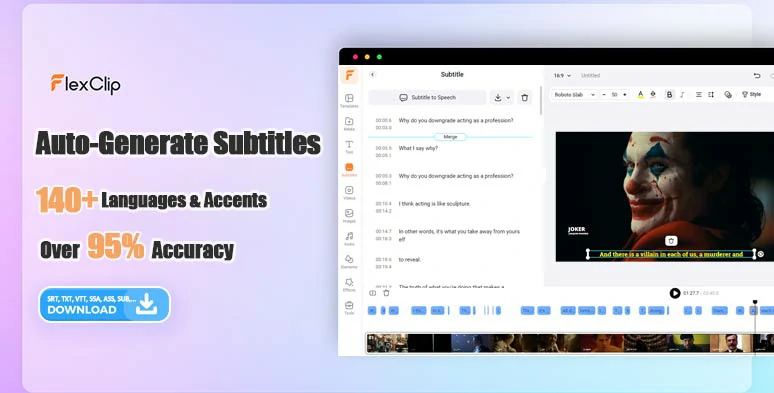
  • Use AI auto subtitle generator to automatically transcribe Chinese text-to-speech to text for burned-in subtitles of your video projects. The auto transcription promises over 95% accuracy and supports 140+ languages and diverse accents. You can easily edit, stylize, or download subtitles in SRT, TXT, SUB, CSV, VTT, SBV, ASS, or SSA formats for translations, blog posts, newsletters, or other repurposings.
  • Auto-generate burned-in subtitles for your video projects

    Auto-generate burned-in subtitles for your video projects.
    Use AI auto subtitle generator
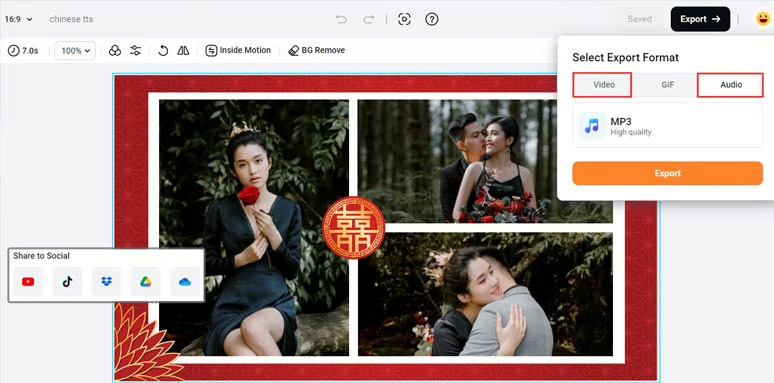
  • Done with the editing. You can save the Chinese text-to-speech AI voices as MP3 audio or a 1080P MP4 video for easy sharing to YouTube, Google Drive, One Drive, Dropbox, or TikTok.
  • Save Chinese text-to-speech projects in MP3 or MP4 format for easy sharing

    Save Chinese text-to-speech projects in MP3 or MP4 format for easy sharing.
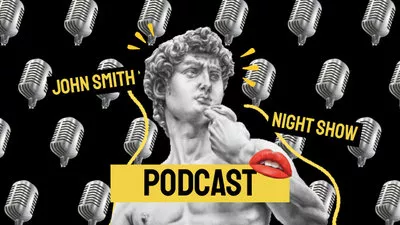
  • On top of that, you can utilize thousands of cinematic and fully-customizable video templates, including YouTube videos, podcasts, book trailers, movie trailers, product explainers, business promos, educational & training, holidays, travel, slideshows, newscasts, webinars, sports & fitness, etc. With an easy drag and drop of your video assets, you can create a scroll-stopping video in minutes.
  • Funny Podcast Collage Intro
    Preview
    Funny Podcast Collage Intro
    Use This Template
    Education Course Promo
    Preview
    Education Course Promo
    Use This Template
    Mobile App Promo
    Preview
    Mobile App Promo
    Use This Template
    Galaxy Style Book Promo
    Preview
    Galaxy Style Book Promo
    Use This Template
    Online Business Event Promo
    Preview
    Online Business Event Promo
    Use This Template
    Online Course Promo Video
    Preview
    Online Course Promo Video
    Use This Template
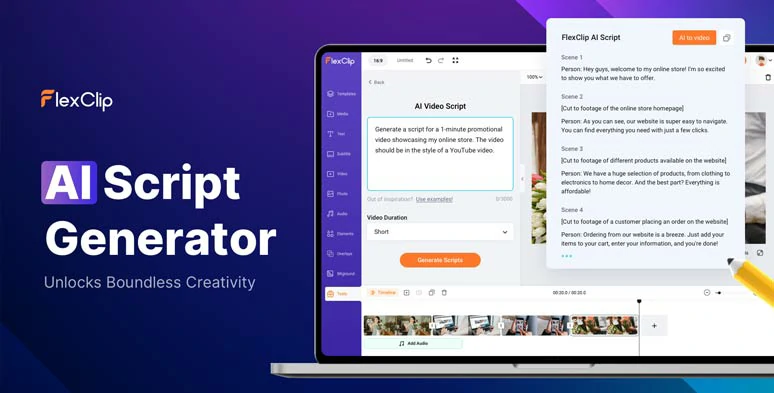
  • Moreover, as a versatile AI video maker, FlexClip empowers you with other time-saving AI tools. From AI video script generator, powered by ChatGPT, to AI blog to video converter, text-to-image generator, text-to-video generator, image background remover, and audio extractor, you can streamline your video editing process and reclaim tons of precious time.
  • Use AI video script generator to write scripts for your videos

    Use AI video script generator to write scripts for your videos.

    Use AI Video Script Generator

    How to Convert Text to Realistic Chinese AI Voices by FlexClip:
    Use AI Video Script Generator
    Step 1
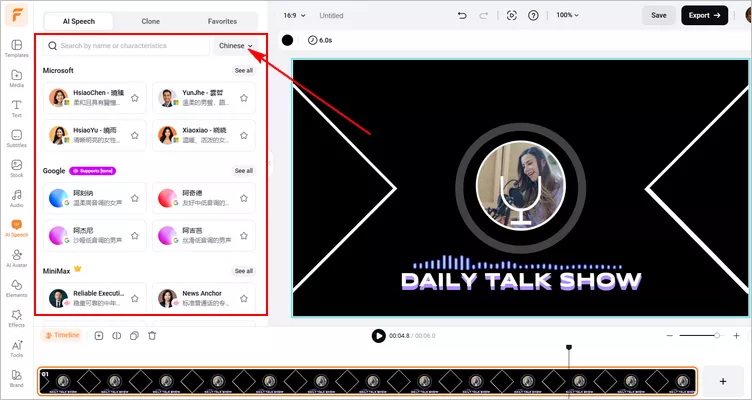
    Access FlexClip AI Speech tool, pick a voice avatar you'd like to use. Or, you can use the Voice Clone feature to create a custom voice avatar. Just drag and drop a voice recording or record a snippet with our voice recorder. Within seconds, AI will recognize the voice and create a clone you can use to turn text into natural-sounding Chinese speech.
    Convert Chinese text to speech by FlexClip - Select Voice
    Convert Chinese text to speech by FlexClip - Select Voice

    Step 2
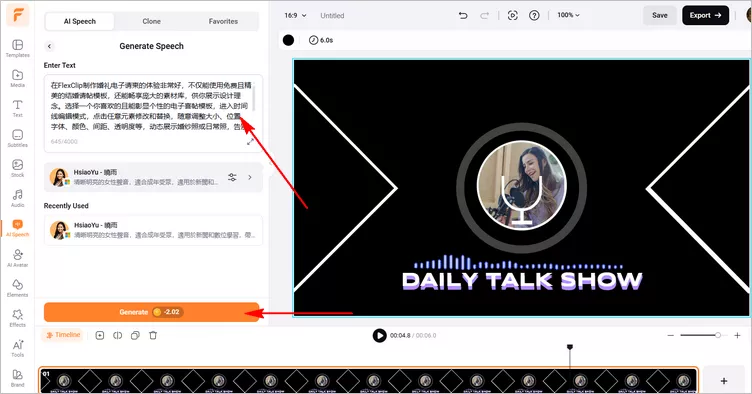
    Once you have made all the things done, paste your Chinese text into the text block and tap on Generate icon to convert your text into Chinese speech.
    Convert Chinese text to speech by FlexClip - Paste Text
    Convert Chinese text to speech by FlexClip - Paste Text

    Step 3
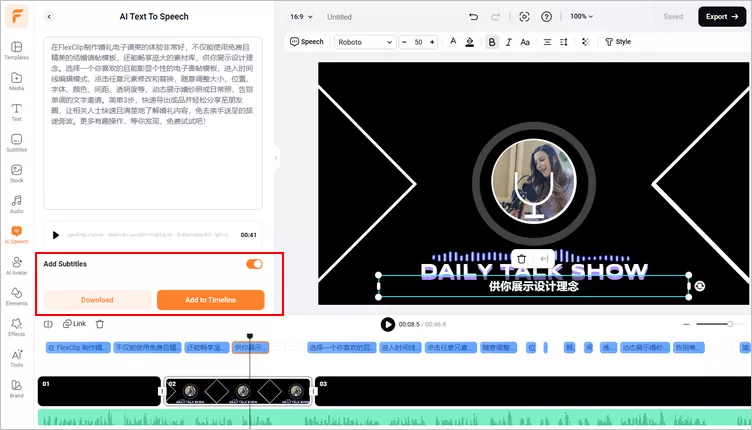
    Within seconds, the AI-generated Chinese speech will be ready to preview and download. Just preview the AI-generated Chinese text-to-speech voice and hit the Download button to save the audio file directly. Or you can click the Add to Timeline button to apply the Chinese AI voices to your video project, subtitle feature is also available for you to caption you video automatically. Pretty handy!
    Convert Chinese text to speech by FlexClip - Preview & Download

    Convert Chinese text to speech by FlexClip - Preview & Download

    Downside:

  • Some regional Chinese AI voice accents don't have many voice styles to choose from.
  • 2. Murf.AI

    If you mostly need ultra-realistic Chinese text-to-speech for your podcasts, audiobooks, E-learning materials, presentations, etc., Murf.AI, a professional AI voice generator that utilizes AI’s deep learning technology for making lifelike Chinese AI voice, is another go-to choice for you.
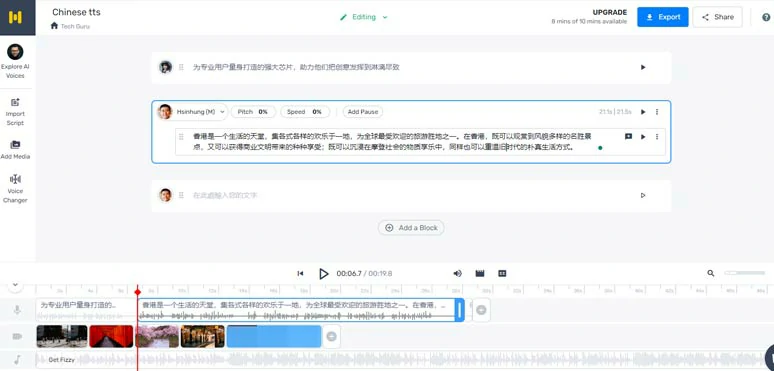
    Convert Chinese text to speech by Murf.AI

    Convert Chinese text to speech by Murf.AI.

    Best Features to Convert Chinese Text to Speech with Murf:

  • Offer you 9 realistic text-to-speech Chinese AI voices, covering 5 standard Mandarin accents, 2 Cantonese accents, and 2 Taiwanese accents. You can customize Chinese AI voices’ gender, age, voice style, voice speed, pitch, pause, emphasis and even pronunciation.
  • Import TXT, Docx, and SRT files to directly convert Chinese text to realistic AI voices.
  • Upload pre-recorded Chinese voice audio and use the Voice Changer tool to remove background noise and turn it into a professional Chinese AI voice.
  • Offer auto Audio Docking tool to automatically lower the volume of BGM when music tracks overlap AI voices.
  • Save Chinese AI voice to Audio-only format, such as MP3, WAV, FLAC, etc. in high quality or MP4 and MOV video format.
  • Add stock music, images, and videos, along with TTS Chinese to create basic slideshow videos.
  • How to Convert Text to Realistic Chinese AI Voices by Murf:

    Step 1
    Access Murf’s online studio > click Create Project > select Audio or Video project > click Create Project.
    Step 2
    Copy and paste your Chinese text into the text block > click the AI voice profile to access AI voice’s library > search for “Chinese” in the language search bar > preview and AI voice and select the Chinese AI voice and accent you like.

    Alternatively, you can click the Import Script tab to upload a text file to convert text to speech in Chinese in batch.

    Step 3
    Click Generate Audio button to create the Chinese text-to-speech > customize the voice style, pitch, speed, natural pauses, emphasis or highlight words to customize their pronunciation.
    Step 4
    Click Add Media tab > add royalty-free music, images and videos needed. You can upload your video assets as well.
    Step 5
    Click the Export button to download audio-only or video files to your PC.

    Downside:

  • Limited Chinese text-to-speech voices.
  • There is no way to trim or split AI voices.
  • Cantonese & Taiwanese Chinese AI voices don’t have voice styles to choose from.
  • No sound effects available.
  • Limited video editing tools.
  • 3. Narakeet

    If all you need is to convert Chinese text to speech without too many edits, then another easy-to-use online Chinese text-to-speech converter you will love is Narakeet. It’s a user-friendly text-to-speech generator that allows you to directly convert Chinese text or document files to lifelike speech in Chinese AI voices. The intuitive interface is second-to-none.
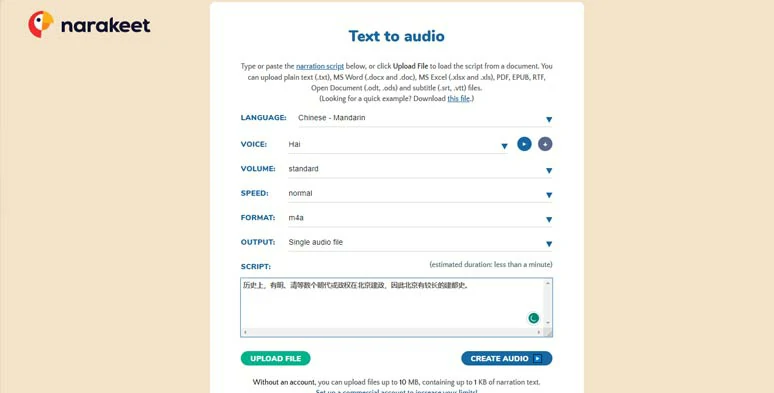
    Convert Chinese text to speech by Narakeet

    Convert Chinese text to speech by Narakeet.

    Best Features to Convert Chinese Text to Speech with Narakeet:

  • Select from 40 realistic Chinese AI voices, including 27 standard Mandarin accents, 1 Shaanxi accent, 1 Henan accent, 1 Shandong accent, 4 Cantonese accents, and 6 Taiwanese accents. You can select female, male, and children Chinese AI voices, and customize the voice’s volume, and speed.
  • Upload extensive text files, such as TXT, SRT, VTT, ODT, ODS, PDF, EPUB, RTF, DOCX, and DOC, to directly convert Chinese text to speech.
  • Export audio-only format (M4A, MP3, WAV) or audio with closed-caption file.
  • How to Convert Text to Realistic Chinese AI Voices by Narakeet:

    Step 1
    Access Narakeet Chinese text-to-speech generator > select Chinese Mandarin/Cantonese/Taiwanese accents needed > preview Chinese AI voice avatar’s voice and choose the one to your liking > copy and paste Chinese text in the Script box. Or, you may also upload a text file for TTS Chinese.
    Step 2
    Adjust the Chinese AI voice’s volume, voice speed, export format (M4A, MP3, WAV or single audio file, audio+ closed captions, or a Zip file).
    Step 3
    Click Create Audio to convert Chinese text to speech.
    Step 4
    Preview the AI-generated Chinese AI voice > download the audio to your PC.

    Downside:

  • Free users can only upload max 10MB file for Chinese text to speech.
  • No audio, image, and video assets available.
  • Can’t preview the AI-generated voice for your imported text in real-time.
  • No options to set the voice style of Chinese AI voices.
  • Can’t export videos with audio.
  • 4. Speechify

    Last but not least, if you only need a Chinese text-to-speech tool to help you convert Chinese text to human-sounding Chinese AI voices for listening, such as e-books, blog posts, emails, PDFs, so you can ease the eye strain or read your documents with ears while doing chores or workouts, then using Speechify, a versatile and cross-platform text to speech reader, is exactly what you’ve been looking for.
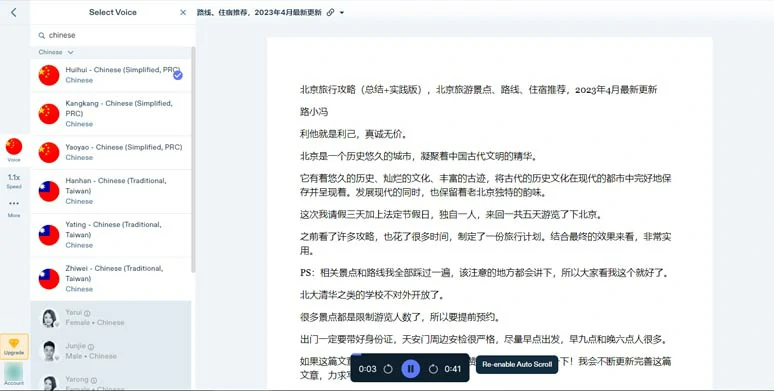
    Convert Chinese text to speech by Speechify

    Convert Chinese text to speech by Speechify.

    Best Features to Convert Chinese Text to Speech with Speechify:

  • Offer you 9 realistic Chinese AI voices covering Mandarin, and Taiwanese accents to convert Chinese text to speech for listening.
  • It is available on its web portal, Chrome extension, and mobile app.
  • You have multiple ways to convert Chinese text to speech, for instance, from local documents, URLs, Google Drive, Dropbox, or Scan document (mobile app).
  • How to Convert Text to Realistic Chinese AI Voices by Speechify:

    Step 1
    Access Speechify's in-browser app > click New > upload your text document or paste the blog’s URL. Then, Speechify will automatically convert Chinese text to speech.
    Step 2
    Click the Voice tab > search for "Chinese" AI voice avatars and pick the one you like.
    Step 3
    Customize the playback speed of Chinese text-to-speech. For premium subscribers, you may opt to skip content like headers, footers, braces, citations, parentheses, URLs, etc.

    Downside:

  • There is no way to download converted Chinese AI voices.
  • Most natural-sounding Chinese AI voices are only for premium users.
  • No options to customize the styles of Chinese AI voices.
  • Now, It's Your Move

    Converting Chinese text to speech makes it easy for you to transform written Chinese text to more sharable audio content for audiobooks, YouTube video voiceovers, E-learning materials or multitasking, etc. So, please feel free to experiment with the Chinese text-to-speech converters mentioned above and share this post on Facebook or Twitter and tell us which one works best for you. Cheers!

    Convert Chinese TTS Now Use Free Video Templates
    Group 11
    Make a free video online
    Create Your First Video With FlexClip Now
    Get Started - Free