Want to make your video pop up? Try to add a brush stroke effect to give your content a creative look. Additionally, it can be used as a transition to emphasize the subject and add more dynamic vibe to enhance video content. But how to add a brush stroke effect to your video? Don't worry! Simply follow our lead to explore two ways for integrating brush effects into your video. Let's dive in!
Free and Customizable Video Templates with Brush Stroke Effects:
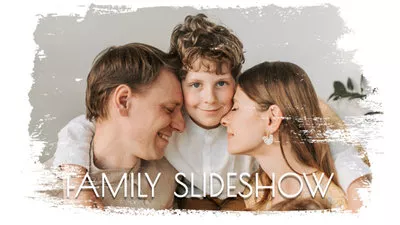

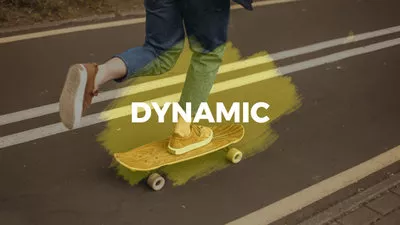
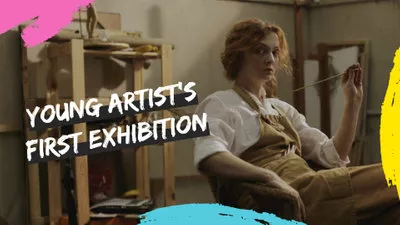
Part 1. Add Brush Stroke Effect to Video/Photo Online
Instead of using pro-level editing software like After Effects to add brush stroke effect, a user-friendly online video editor called FlexClip is a more effective and easier way for you to apply creative brush stroke effect to video and photos.
As a full-featured video editor, FlexClip provides you multiple ways to integrate brush stroke effect into your videos. Whether it's brush stroke text with brush-like texture, brush stroke stickers that mimics hand-painted art or stylized brush stork overlay to enhance storytelling with a classic art, FlexClip gets you covered with full control of how the brush stroke effect look like. To help you understand it better, let's see some details about brush stroke effects in FlexClip.


1.Brush Typography Pack
Reveal text with a brush stroke effect to wow your audience. FlexClip packs various title presets around different themes with brush stroke effects, helping you convey message in a more dynamic way. It could be a circle shape to showcase your title or creative shapes to unleash creativity. No matter what type of typography pack you use, you have full control over changing size, color and adding motions.

Brush Title Pack in FlexClip for You
2.Brush Animated Elements
Bring your art video to life with animated brush elements. There are loads of funny and original brush animations to perfect your art videos. Be it brush elements in solid color, stickers with brush stroke effects or creative items to present brush strokes, FlexClip can always offer you the most satisfying result without copyright issues.

Brush Stroke Animated Sticker in FlexClip
3.Brush Art Overlays
Need some brush photos for your slideshow? Want to give your video a brush broke effect look? FlexClip is here for help! Over 20 creative & transparent brush stroke overlays are all available to give your content a dreamy, painterly aesthetic with one tap click.

Brush Art Overlays for Artistic Video Look
4. Brush Art Mask Presets
Say goodbye to normal content sharing! Wear your photos and videos a brush stroke mask to make it stand out. There is no complicated manual edits required! Simply browse our extensive collection of brush stroke masks, pick your favorite, and instantly transform your content into a work of art

Extensive Brush Art Mask Presets in FlexClip
If you need a blueprint to guide your brush stroke effect creation or prefer a ready-made template to complete the replacement with easy drag-and-drop operation, FlexClip has multiple brush stroke templates in diverse themes for you to use.

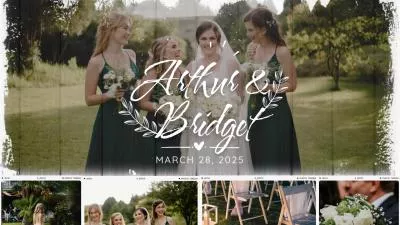

How to Create a Brush Stroke Effect Video Using FlexClip
FlexClip helps you create videos with brush stroke effects, be it brush slideshow or art videos. Now follow the guidelines below to create a brush stroke video online using FlexClip.

Upload the Resource You Want to Add Brush Stroke Effect in FlexClip

Apply a Brush Stroke Effect to Your Video

Add Brush Stroke Titles to Your Video

Add Animated Brush Stroke Items to Your Video

Add Soundtrack to Your Video
Go beyond brush stroke effect adding, FlexClip, as a full-featured video editor, packs a wide range of AI tools to speed up your video creation process and boost creativity possibilities. From script generation, video creation from text, AI image generator, craft natural-sounding voiceover from text, AI image style changer, etc., you can harness these AI tools to bring your vision into reality in a breeze.
AI Tools in FlexClip to Unlock Endless Creativity
Part 2. How to Make Brush Stroke Effect in After Effect
Creating brush stroke art and animation in your video is easy with Adobe After Effects. The industry-standard visual tool is competent for visual effects and motion graphics in digital art. Also, it will lend you a hand to make a brush stroke effect. You can follow the tutorials below to learn how to add brush stroke effects on After Effect.
Open After Effect, click "New Composition" in the main interface, and rename it if necessary. Next, go to Layer>New>Solid to create a solid white background. Also, give it a new name if you like.
Now create another new composition for the brush and easily adjust the height and width. After that, produce a white layer above the brush layer and you need to change the shape by clicking the Mask Tool icon on the top > Ellipse.
Go to the Effects & Presets panel and find the fractal option. Then grab Fractal Noise" and drop it into the white solid layer. Here you can increase the contrast value to 300. After that, select the "Evolution" keyframe and drag it to the end of your timeline.
Go to the main composition and change the Brush composition above the white solid layer. Use the Pen tool to draw a letter or shape you like. From the left, go to "Path" and press "Ctrl + C" to copy. Then select the brush layer and hit "P." Select "Position" and pierce that.
Tap "Layer" >"Adjustment Layer"> "New and go to the Effects panel to "Echo option. Then drag it to the layer you're working. Here you need to change some parameters to enable the echo effect. Below is a parameter example for reference.
In the "Effects Control" panel, increase the echo number to around 400 and set "Echo Operator" to "Minimum." Also, set the "Echo Time" as low as you can while keeping it smooth.
Adjust the opacity and size of the brush you've added and save it. If you do not satisfy the result, apply the "Fast Box Blur" effect from the Effects panel to make it smoother. When you're done, save and export the brush stroke effect.
Animated Brush Strokes in After Effects
The Bottom Line
Simple paint brush strokes make significant differences in your art creation. Now you've known how to make a brush stroke effect in two ways. Try the designer-made brush strokes effects in FlexClip to level up your videos effortlessly.




FlexClip AI Video Maker
Reach professional-quality videos faster with easy editing tools, templates, and smart AI.
Start Now for Free
Hot & Trending
-

Best Ways to Find Music in YouTube Videos
-
Instagram Story Video Quality Bad After Upload? Fix It!
-
How to Repost Video on TikTok & How to Remove TikTok Repost
-

Improve Video Quality Online: 3 AI Video Quality Enhancers You Can't Miss
-
4K Convert to HD 1080p without Watermark: Best 4k Video Converters
-
Best 8 Free Video Editors - No Download Required
-
Top 13 Birthday Video Makers with Music and Effects Free
-
How to Search Filters on TikTok & Use a Filter You See - TikTok Filter Guide